

How to Build Scannable Tables in Medical Manuscripts
Introduction
Scannable tables can make or break a medical essay or research paper. If readers cannot grasp the data in seconds, they move on. In clinical writing, that means lost clarity, weaker impact, and slower peer review. The good news is that a strong table is not hard to build. It only needs the right structure, clean formatting, and a clear message.
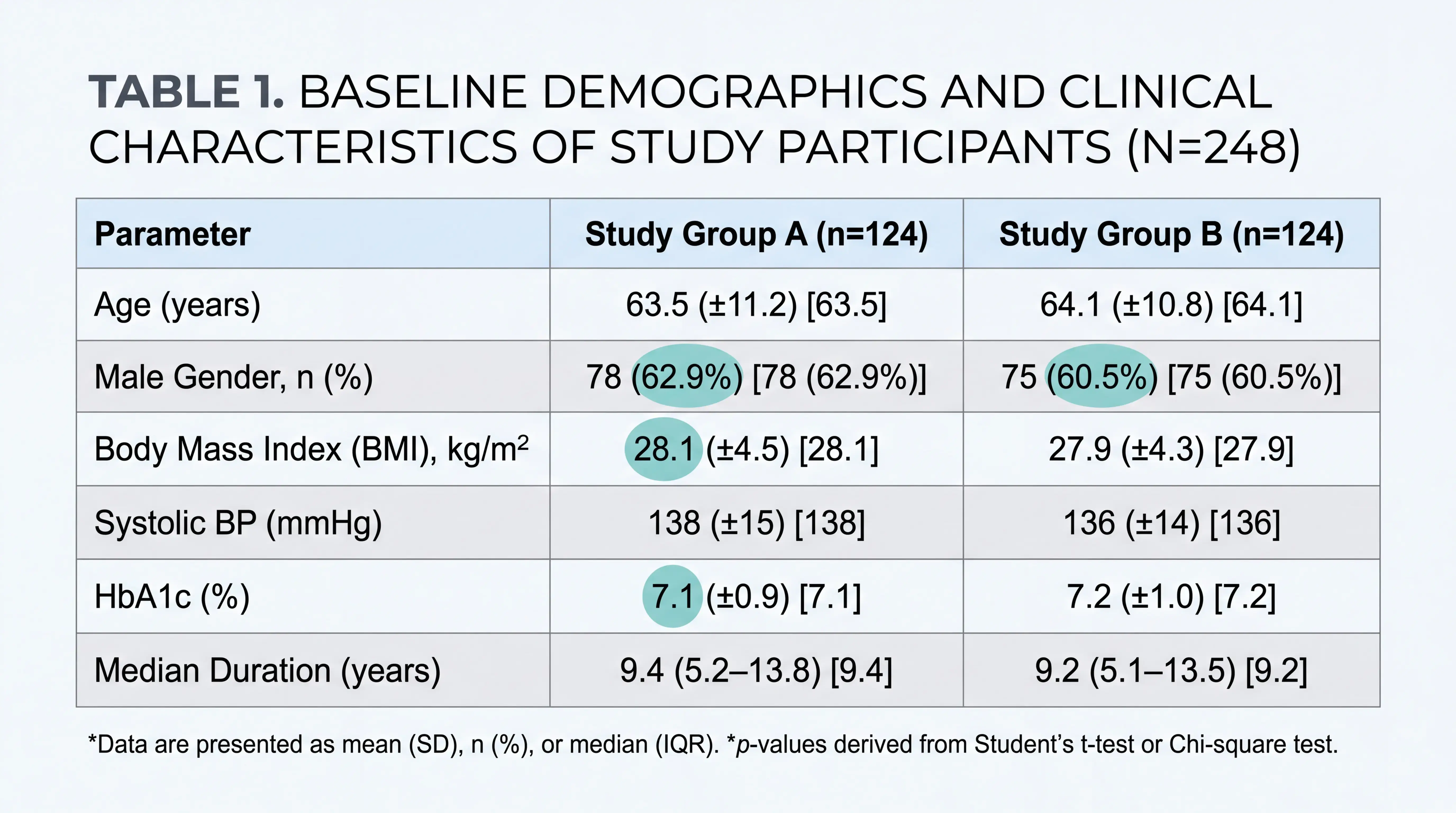
1. Why Scannable Tables Matter in Medical Writing
1.1 Tables should communicate without extra explanation
In medical manuscripts, a table is not decoration. It is a compact form of evidence. A reader should understand the core data by looking at the table alone. This is the standard of a well-built table.
A good table is self-explanatory, easy to scan, and consistent in logic.
That is especially important in clinical studies, where readers often compare groups, endpoints, or baseline characteristics.
For medical students, physicians, and researchers, this matters because tables often carry the first real statistical impression of a study. If the table is confusing, the entire paper feels less reliable.
1.2 Poor table design reduces readability
Many early drafts fail for simple reasons. They include too many borders. They mix too many variables in one row. They do not explain abbreviations. Or they use inconsistent formatting across columns.
In medical journals, especially in Chinese and international SCI-style writing, a three-line table is common. It usually uses only horizontal lines. Vertical lines are removed unless a journal specifically requests otherwise. This clean layout improves reading speed and keeps attention on the data.
2. The Core Structure of a Scannable Medical Table
2.1 Use a three-line format whenever possible
A standard medical table usually has:
- a top line,
- a header line,
- a bottom line.
Additional helper lines may be used inside the header to separate subgroups. But the main body should remain visually clean. The key idea is simple. The table must show hierarchy without visual clutter.
This format helps readers distinguish:
- the column labels,
- subgroup structure,
- the main data area.
That is why many journals prefer it. It reflects a professional standard and reduces visual noise.
2.2 Organize information vertically and horizontally
A scannable table depends on logic. Each column should represent one group or category. Each row should represent one variable.
For example:
- one column may show the case group,
- another column may show the control group,
- a row may report age,
- another row may report sex,
- another may report a clinical outcome.
This structure lets readers compare across groups quickly. It also prevents the table from becoming a paragraph in disguise.
2.3 Keep one unit of meaning per row
Each row should describe one consistent attribute. Do not mix age, sex, and disease stage in the same row. Do not place unrelated statistics together without clear labels.
One row should answer one question.
That is the fastest way to improve scanability.
If the row is about age, show the correct summary statistic. If it is about sex, report counts and percentages. If it is about a laboratory marker, include the unit. Consistency is more important than decoration.
3. How to Present Data Clearly
3.1 Match the statistic to the data type
Medical tables are strongest when the summary statistic fits the data.
Common examples include:
- age as median with interquartile range, if the distribution is skewed,
- sex as number and percentage,
- continuous variables as mean with standard deviation, when appropriate,
- categorical variables as n and %.
The statistic should reflect the nature of the data, not just style preference.
This improves scientific accuracy and makes the table easier to interpret.
If a table shows age as median and IQR, readers immediately know the authors recognized the distribution pattern. That is a sign of methodological care.
3.2 Use clear numerical formatting
Numbers should be easy to compare. Keep decimal places consistent. Align values in a way that supports fast reading. Avoid unnecessary precision.
Practical rules include:
- use the same number of decimal places within a variable,
- show percentages consistently,
- avoid repeating units in every cell if the unit already appears in the header,
- use abbreviations only when they save space and are defined in a note.
These are small details. But they strongly affect readability.
3.3 Do not overload the table
A table should not try to do everything. If it becomes too dense, readers lose the point.
Good tables focus on one main purpose:
- baseline characteristics,
- subgroup comparison,
- outcome summary,
- model results,
- literature synthesis.
If a table contains too many variables, consider splitting it into two tables. That often improves clarity more than compressing everything into one crowded layout.
4. Formatting Rules That Improve Scanability
4.1 Remove vertical lines unless required
Vertical lines usually do not help in medical tables. They add clutter and make the table harder to scan. Most journal-style tables work better without them.
This is one reason Word is often preferred over Excel for manuscript tables. Word gives better control over border lines, spacing, and layout when preparing a submission-ready table.
Clean borders are not only aesthetic. They improve comprehension.
4.2 Use notes for clarification
A good table often needs a note section below it. This is where you explain:
- abbreviations,
- statistical tests,
- symbols,
- subgroup definitions,
- special conditions.
This is important because the table itself should stay compact. Notes carry the extra detail without interrupting the main reading flow.
Do not rely on the body of the table to explain everything. Put technical clarifications in the note area.
4.3 Use symbols carefully
Symbols are useful, but they must be consistent. In scientific tables, asterisks often indicate statistical significance. That means you must use them correctly and define them clearly in the note.
A common convention is:
-
- for p < 0.05,
- ** for p < 0.01,
- *** for p < 0.001.
If your journal uses a different rule, follow the journal. Never leave symbols unexplained. That creates confusion and reduces trust.
5. A Practical Workflow for Building a Scannable Table
5.1 Start with the message
Before formatting, decide the table’s purpose. Ask:
- What question should this table answer?
- What is the most important comparison?
- What data are essential, and what data are optional?
This step prevents random structure. It also helps you design the table around the reader’s needs, not around the dataset alone.
5.2 Draft the table title first
The title should be short, specific, and descriptive. Avoid vague openings like “A table of.” Say what the table contains.
For example:
- Baseline characteristics of the study population
- Clinical outcomes by treatment group
- Molecular pathways associated with USP28 in different cancers
A strong title tells the reader what to expect before they read the rows.
5.3 Build columns and rows with a logical hierarchy
Place the main comparison in the columns. Place the variables in the rows. If needed, use nested subheaders to separate groups.
This is especially useful in clinical research tables where subgroup data appear under one larger category. A clean header hierarchy helps the reader move from broad group to specific subgroup without friction.
5.4 Review for consistency
Before submission, check:
- units,
- decimal places,
- abbreviation definitions,
- significance markers,
- alignment,
- border style,
- note completeness.
A final review often catches the errors that weaken table quality the most. In many cases, small inconsistencies matter more than the data itself.
6. Common Mistakes to Avoid
6.1 Turning the table into a wall of numbers
If every cell is crowded, the table stops being scannable. Readers should not need to decode the structure. If they do, the design has failed.
6.2 Using inconsistent terminology
Do not alternate between terms like “patients,” “cases,” and “subjects” without a reason. Do not switch between full names and abbreviations in an unclear way. Stable wording improves clarity.
6.3 Forgetting the note section
A table without notes is often incomplete. Readers may not understand abbreviations, statistical thresholds, or group definitions. That creates friction and weakens the manuscript.
6.4 Ignoring journal-specific style
Different journals have different preferences. Some accept slight border variations. Others are stricter. Always check the target journal’s published examples before finalizing the table.
7. How Tools Can Speed Up Table Preparation
7.1 Use intelligent support to reduce formatting friction
Even experienced authors lose time adjusting borders, notes, and layout. That is where a specialized writing workflow can help. Tools like scifocus.ai can support manuscript organization, improve drafting efficiency, and help authors stay consistent across sections.
For busy medical students, clinicians, and researchers, that means less time fixing formatting and more time improving scientific content.
7.2 Keep the focus on clarity, not manual editing
The best tables are not created by spending hours on borders. They are created by planning structure first and formatting second. A good workflow helps you move faster without sacrificing journal standards.
If your table is clear, your manuscript feels stronger immediately.
That is why efficient support tools are valuable in medical writing.
Conclusion
Scannable tables are a core skill in medical manuscript writing. They help readers understand data quickly, support statistical accuracy, and improve the overall quality of an essay or research paper. Use a three-line structure, match statistics to data type, keep rows consistent, and add notes where needed. Remove visual clutter. Make the message easy to see.
If you want to write faster and format better, explore scifocus.ai as a practical support tool for manuscript drafting and table preparation. Clean tables save time, improve clarity, and make your research easier to trust.
Did you like this article? Explore a few more related posts.
Start Your Research Journey With Scifocus Today
Create your free Scifocus account today and take your research to the next level. Experience the difference firsthand—your journey to academic excellence starts here.